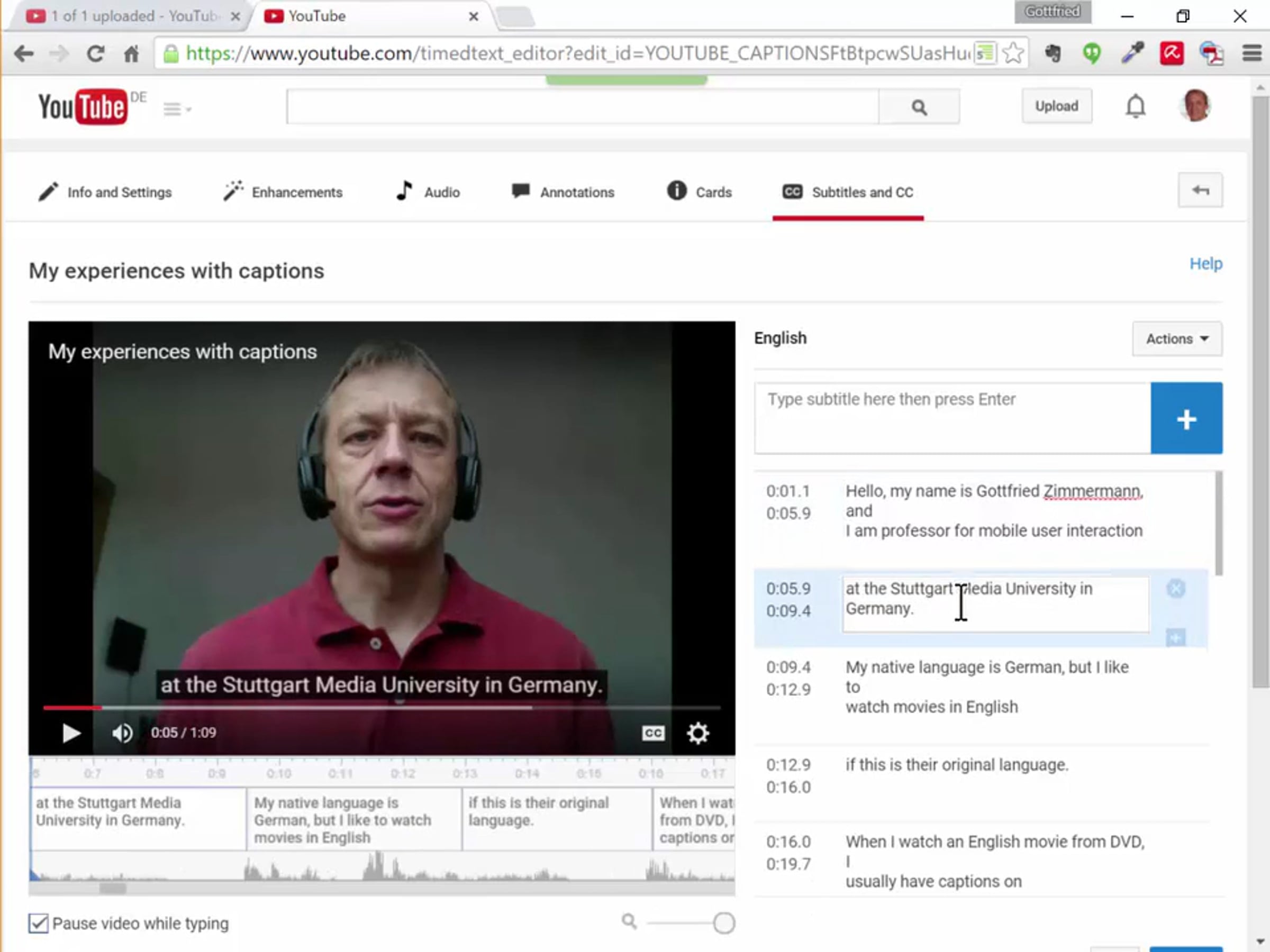
Caption It! How to caption your video on YouTube.

This video explains step-by-step how to make a video on YouTube, and how to caption it.
© Gottfried Zimmermann, 2015-2017.
This video was created in the context of the MOOC Accessibility Partnership (http://gpii.eu/moocap/) for use in the FutureLearn course "Digital Accessibility: Enabling Participation in the Information Society" (https://www.futurelearn.com/courses/digital-accessibility).
Note: YouTube has removed the webcam recording feature that is used in this video.
This resource is hereby made available to the public under the terms of the Creative Commons by Attribution (CC-BY 4.0) license.
The creation of this resource has been partially funded by the ERASMUS+ grant program of the European Union under grant no. 2014-1-DE01-KA203-000679 (MOOC Accessibility Partnership). Neither the European Commission nor the project's national funding agency DAAD are responsible for the content or liable for any losses or damage resulting of the use of these resources.
Get started for free
24/7 customer support
Our customer support team is available to help 24/7. Enterprise members also receive dedicated account managers and a guaranteed uptime SLA.
© 2026 Vimeo.com, Inc. All rights reserved.
TermsPrivacyYour Privacy ChoicesU.S State PrivacyCopyrightCookies