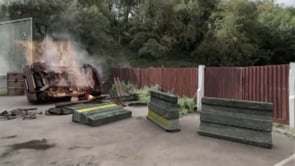
Watch this emotive scene from the University of Hertfordshire's Tom Balev, created with NUKE.
Tom was asked to incorporate CG elements into existing real-life footage, in his own words: "My initial idea was to create a crash scene although I didn't want to create just an ordinary set-extensions projects without any emotion to it whatsoever. I realised I could incorporate the driver walking away from the crash scene by using various sound effects (breathing, heart beat etc). Using V-Ray I created separate render layers which meant I didn't need to re-render the entire scene when corrections were needed. I used an entire range of render elements including ambient occlusion, velocity passes, z-depth, shadow passes and more. Everything was exported as a multichannel 32-bit EXR to preserve floating point information. In NUKE individual render layers were separated, colour corrected and merged together. I added additional z-depth blur along with vector blur using my previously exported velocity pass. Final steps included some imperfections like grain, lens correction, lens reflections, chromatic aberration and vignetting. I can't think of any other software than NUKE which would be more suitable for this projects workflow. NUKE is extremely powerful and robust compositing software packed with the variety of features I needed to successfully accomplish this task.
Modelling, texturing and lighting completed in Maya.
This channel features great work created by students using The Foundry's products. If you would like to see your work featured here, please email [email protected] with:
- your name
- where you're studying
- which software from The Foundry…
This channel features great work created by students using The Foundry's products. If you would like to see your work featured here, please email [email protected] with:
- your name
- where you're studying
- which software from The Foundry you used on your project
- a brief description of your project