
Create | Holidays | Christmas

Free Christmas video templates: make animated holiday videos online

Explore Vimeo's Christmas video templates

How to make an animated Christmas video for your business for free

Choose a Christmas video template

Add images from Vimeo’s stock library

Edit and customize your video

Share your Merry Christmas wishes video

  • Vimeo Create offers a preloaded suite of easy-to-use tools perfect for early-stagers like us. We created dynamic video content in minutes without the time suck or high price tag you would expect.
    Bowie CheungCo-founder and CEO of Pepper Pantry
  • Vimeo is great for us: everything lives in one place, and there's no sharing of large files that take a long time to download. And once the video is done, it's really easy for us to share on social and embed into websites.
    Kyle RajaneimiMarketing Manager at Yeti Cycles
  • Vimeo Create allows us to easily create videos that can be posted on our IG Stories, feed, and website. It makes creating videos simpler and less time consuming!
    Felicia AlexanderCo-founder and President at Boxunion

Add a Christmas intro to your video — animated holiday templates

Want to quickly give your existing footage a festive boost? Adding a short, dynamic opener is a great way to immediately grab viewers, especially if you are sharing on social media. Using the Vimeo christmas holiday video maker makes it simple to craft high-quality christmas intros. You can choose from many professionally designed, animated templates and customize them to fit your brand colors or personal style in minutes. These small details ensure your full video looks polished and ready for the season.

  • Use christmas video animation to add movement and excitement, keeping viewers engaged from the first second.
  • Easily customize the text, colors, and logos within the template to match your branding.
  • An intro is perfect for adding a professional touch to holiday greetings or promotional videos.

The best video format for sharing Christmas videos on social media

After you create your holiday video using our video template video maker free online tool, the next step is making sure it looks perfect when you share it. Different platforms favor different video formats and aspect ratios. Choosing the right one is key to ensuring your christmas wishes with animation look clear, load quickly, and display correctly on every device. Our editor is designed to help you manage these technical details easily, allowing you to focus on the message.

  • For Instagram Reels and TikTok, a 9:16 vertical aspect ratio (1080x1920) is usually best for full-screen viewing.
  • YouTube and Facebook generally recommend a 16:9 landscape aspect ratio (1920x1080).
  • Square videos (1:1, 1080x1080) are a versatile option that works well on most platforms for maximum visibility.
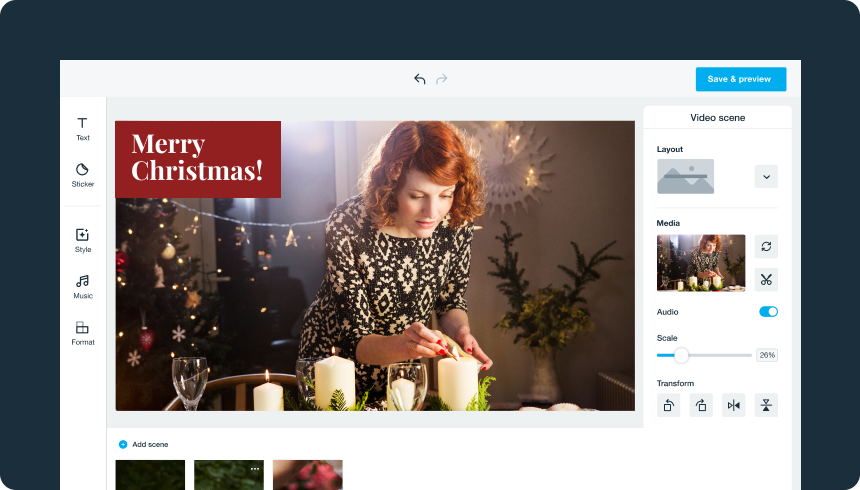
Make a Christmas video

Tips for creating a Christmas video that brings warmth all year

Vimeo’s free Christmas video creator lets you make Christmas videos to post on Facebook, YouTube, or email to loved ones—all in minutes. Use the following tips to craft a social media Christmas video or festive family greeting that they’ll remember long past the holiday season.

Get creative with your video

Although some of the best Christmas videos are simple greetings, there’s nothing wrong with getting a little creative. Try something new for this year’s video, like filming the family opening their presents or having everyone sing a few Christmas carols for loved ones who live far away. You might even film your whole Christmas Day and edit it with Vimeo Create to create a Merry Christmas wishes short video that showcases your favorite highlights.

Focus on personal instead of professional

A family Merry Christmas wishes video should feel warm, like home. Try to avoid making it too “perfect” and movie-like, and instead let your personality shine through. There’s no need to edit out mistakes or bloopers unless you find it necessary (your family will probably love them!). Whatever you do want to edit, you can use Vimeo to do it. Trim videos, cut clips, and make everything come together with colors, filters, text, and more.

If you’re making a Christmas video for your business to share with customers, you can still get personal. Share clips of your staff enjoying holiday activities, tell your brand’s story as it relates to Christmas, and personally thank your customers for sticking around during the holiday season.

Make your message loud and clear

Whether you’re sending season’s greetings to loved ones from a distance or spreading holiday cheer to clients, make sure your message comes across in your video. You can add holiday music to your video to set the mood and add text at the end with your holiday message. Use your images and video clips to tell the story the whole way through.

Send season's greetings with a custom Christmas video

Find the right plan for you.

Video experience platform

Everything you need to make, manage, and share brilliant videos

Simple

Cinematic

Controlled

Automated

Have questions?

Frequently asked questions about Christmas video templates